How to Download, Save, and Organize Free eBooks Easily
In today’s digital world, free eBooks are everywhere. From timeless literary classics and educational textbooks to self-help guides and niche technical manuals, readers can access thousands of titles legally and at no cost. But while downloading free eBooks is simple, managing them effectively is where many readers struggle.
Without a clear system, your digital library can quickly become chaotic files get lost in your downloads folder, duplicates pile up, formats become incompatible, and finding the right book becomes frustrating.
The good news? With a few simple strategies, you can build an organized, searchable, and accessible eBook collection across all your devices.
This guide explains where to find free eBooks legally, how to download them safely, and how to organize them like a pro, so you can spend less time sorting files and more time reading.
1. Where to Find Free eBooks Legally
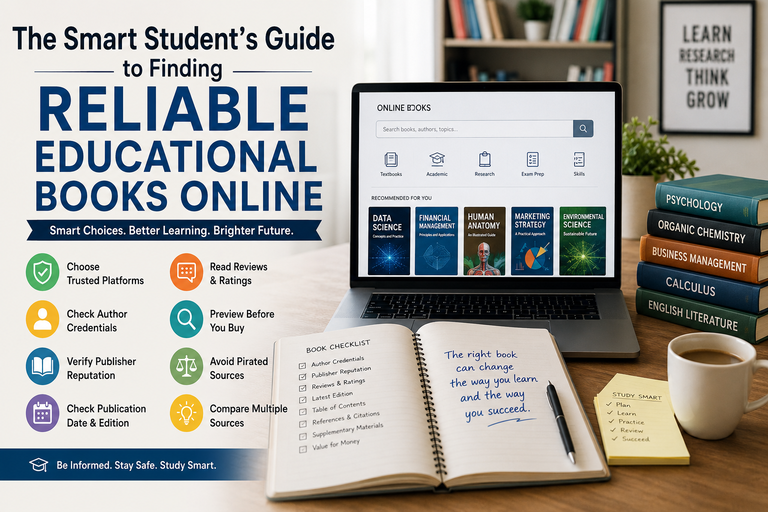
Before downloading any eBook, it’s important to make sure the source is legitimate. Many websites offer free downloads illegally, which may expose you to malware, poor-quality files, or copyright issues.
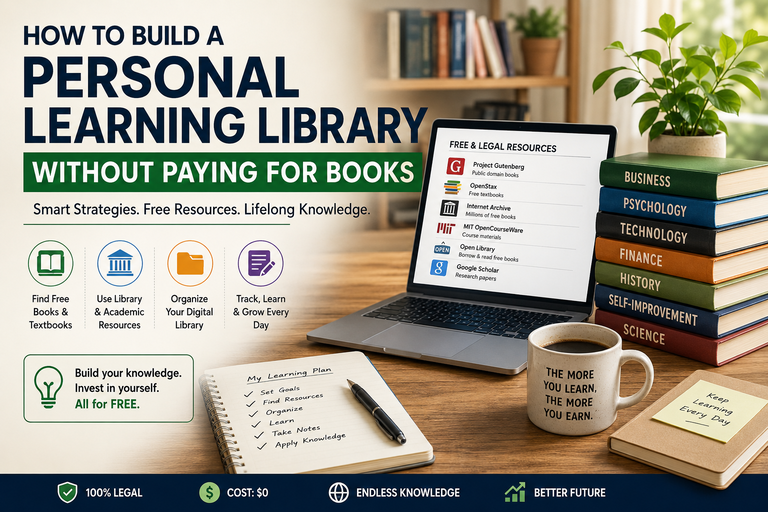
Here are some of the best trusted platforms for legal free eBooks:
Public Domain Libraries
These sites provide books that are no longer under copyright protection.
Project Gutenberg
One of the oldest and most respected digital libraries, Project Gutenberg offers over 60,000 free eBooks, including classics from authors like Jane Austen, Charles Dickens, and Mark Twain.
Best for: Classic literature and historical texts
Internet Archive
The Internet Archive hosts millions of digital resources, including scanned books, academic materials, and historical publications.
Best for: Rare books, archived materials, educational content
Open Library
Run by the Internet Archive, Open Library allows users to borrow digital books for free.
Best for: Borrowing newer titles digitally
Academic and Educational Sources
These are excellent for students, researchers, and lifelong learners.
Google Books
Offers free previews and public domain titles.
Directory of Open Access Books (DOAB)
A reliable platform for peer-reviewed academic books.
National Academies Press
Provides many scientific and policy books in downloadable PDF format.
Best for: Textbooks, scholarly materials, research publications
Retailers with Free Sections
Major eBook retailers often offer free books for promotion.
Amazon Kindle Store
Thousands of free Kindle books are available in the "Top 100 Free" category.
Kobo Free eBooks
A wide selection of permanently free titles.
Apple Books Free Section
Free books for Apple device users.
Best for: Modern fiction, indie books, promotional offers
Independent Publishing Platforms
Smashwords
Offers free books from independent authors in multiple formats.
ManyBooks
Curates free classics and indie titles.
BookBub
Highlights limited-time free promotions.
Best for: Indie authors, genre fiction, free promotions
Important Tip:
Always verify that the eBook is legally offered for free. This protects you from copyright issues and harmful downloads.
2. Choose the Right eBook Format
Not every device supports every eBook format, so choosing the right one matters.
Here’s a quick comparison:
| Format | Best For | Key Benefit |
|---|---|---|
| EPUB | Kobo, Apple Books, most readers | Flexible and widely supported |
| MOBI | Older Kindle devices | Legacy Kindle support |
| AZW3 | Kindle | Optimized for Amazon |
| Computers, tablets | Preserves original layout | |
| TXT | Any basic device | Small and simple |
Best Choice: EPUB
If you’re unsure which format to download, EPUB is usually the best option because it works with most eReaders and adjusts text size automatically.
When to Use PDF
PDF files are ideal for textbooks, manuals, or books with fixed layouts, but they are often harder to read on smaller screens.
3. How to Download eBooks Safely
Downloading an eBook should be straightforward, but safe downloading habits are essential.
Simple Download Process:
- Visit a trusted eBook website.
- Select your preferred file format.
- Click the official download button.
- Save the file to a dedicated eBook folder.
Safety Best Practices
Avoid Suspicious Pop-Ups
Some websites display fake “Download” buttons. Only click clearly labeled official download links.
Use Antivirus Protection
Always keep your antivirus software active, especially when downloading files.
Check File Extensions
A legitimate eBook file should end in:
-
.epub -
.pdf -
.mobi -
.azw3
Avoid executable files such as .exe.
Avoid Unnecessary Registration
If a site asks for excessive personal details for a free book, be cautious.
4. Save eBooks in a Dedicated Folder
Many people leave downloaded books in the “Downloads” folder, which quickly becomes cluttered.
A better approach is to create a dedicated eBook directory.
Example Folder Structure:
Documents
└── eBooks
├── Fiction
├── Non-Fiction
├── Academic
└── To Read
This keeps your books separated and easy to browse.
Rename Files Clearly
Downloaded files often have messy names like:
ebook_download_12345.pdf
Rename them to something meaningful:
Atomic_Habits_James_Clear.epub
This improves searchability and reduces confusion.
Recommended Naming Format:
BookTitle_AuthorName.ext
Example:
Deep_Work_Cal_Newport.pdf
5. Use eBook Management Software
If you download books regularly, manual folders may not be enough.
That’s where eBook management software becomes valuable.
Best Tool: Calibre
Calibre is a free, open-source eBook manager that helps you:
- Organize books
- Edit metadata
- Convert formats
- Add tags
- Download covers
- Transfer files to eReaders
It supports nearly every eBook format and makes your library searchable.
Why Calibre Is Useful
Instead of manually sorting folders, Calibre lets you organize by:
- Title
- Author
- Genre
- Rating
- Tags
- Series
You can also convert:
- PDF → EPUB
- MOBI → EPUB
- EPUB → AZW3
This is especially useful when switching between reading devices.
Other Helpful Apps
Adobe Digital Editions
Useful for DRM-protected books.
Kindle App
Great for syncing Kindle books across devices.
Apple Books
Best for Apple users.
6. Organize Your eBook Library
Downloading books is easy finding them later is the challenge.
A proper organization system saves time and reduces clutter.
Organize by Genre
Create categories such as:
- Fiction
- Business
- Self-Help
- Programming
- History
- Biography
This helps you locate books quickly.
Use Tags and Metadata
In Calibre, you can add metadata like:
- Topic tags
- Reading status
- Publication year
- Series number
Example tags:
- Productivity
- Marketing
- Artificial Intelligence
- To Read
- Completed
This creates a powerful searchable system.
Track Reading Progress
Apps like these help manage your reading goals:
- Goodreads
- StoryGraph
- Notion
You can track:
- Books to read
- Current books
- Completed books
- Ratings and notes
7. Sync Your Books Across Devices
Reading on multiple devices is convenient, but only if your books stay synchronized.
Use Cloud Storage
Store your eBook library in:
- Google Drive
- Dropbox
- OneDrive
- iCloud
This allows access from:
- Phone
- Tablet
- Laptop
- eReader
If one device fails, your books remain safe.
Use Reading Apps with Sync
Apps such as:
- Kindle
- Kobo
- Apple Books
- Google Play Books
sync reading progress, bookmarks, and highlights across devices.
This means you can start reading on your tablet and continue on your phone.
8. Back Up Your eBook Library
Your eBook collection can represent years of downloads, purchases, and reading notes. Losing it can be painful.
Best Backup Strategy
Follow the 3-2-1 Rule:
- 3 copies of your files
- 2 storage locations
- 1 offsite backup
Example:
- Main eBook folder on your computer
- Backup on an external drive
- Cloud backup
This protects against hardware failure, accidental deletion, and theft.
9. Convert eBook Formats When Needed
Sometimes the book format you download won’t work on your device.
Instead of downloading again, convert it.
Best Conversion Tool: Calibre
Calibre can convert:
- PDF → EPUB
- EPUB → MOBI
- MOBI → AZW3
This ensures compatibility with any device.
Example:
If a PDF looks bad on an eReader, convert it to EPUB for adjustable text.
10. Build a Simple Reading Workflow
A simple routine keeps your library organized long-term.
Keep a “To Read” Folder
Avoid overwhelming yourself by keeping only 10–20 unread books in your active reading list.
Example:
eBooks
├── To Read
├── Reading
└── Finished
This makes it easier to focus.
Clean Up Regularly
Every few weeks:
- Remove duplicates
- Delete sample files
- Archive completed books
This prevents clutter from building up.
Rate and Review Books
Keeping notes helps you remember what you’ve read and what was worth downloading.
Use:
- Goodreads
- Notion
- Spreadsheet trackers
Track:
- Rating
- Favorite quotes
- Summary notes
11. Advanced Tips for Power Users
If you manage hundreds or thousands of eBooks, these advanced techniques help:
Use Metadata Plugins in Calibre
Automatically fetch:
- Covers
- Series data
- ISBN information
Create Collections on eReaders
Group books into collections like:
- Business
- Novels
- Research
Automate Free Book Alerts
Use BookBub or retailer alerts to receive notifications when free books are available.
Save Highlights to Note Apps
Use tools like Readwise to export highlights into your note-taking system.
Final Thoughts
Downloading free eBooks is easy, but organizing them properly transforms a random pile of files into a usable digital library.
By using trusted download sources, choosing the correct format, organizing folders, and managing metadata with tools like Calibre, you create a reading system that saves time and improves your reading experience.
Quick Recap
- Download from trusted legal sources
- Choose the correct file format
- Save books in organized folders
- Rename files clearly
- Use Calibre for library management
- Back up your library
- Sync across devices
- Maintain a simple reading workflow
With the right setup, your digital library becomes a valuable, searchable resource you can enjoy anywhere.
Happy reading and happy organizing!