Posted by:MKFINEST

2026-03-06
Share this:
How to Build a Complete Free Digital Library as a Student

How to Build a Complete Free Digital Library as a Student

A digital library isn’t simply a random folder full of downloaded PDFs. When designed well, it becomes a powerful personal knowledge system one that allows you to quickly find academic materials, read efficiently, take structured notes, cite sources correctly, and protect your work with reliable backups.

The best part? You don’t need expensive software or illegal downloads to build one. With the right structure and free tools, any student can create a legal, organized, and highly functional digital library.

This guide provides a complete blueprint to help you build your own free digital library system from scratch.


1. Define What “Complete” Means for Your Library

Before installing tools or downloading books, clarify what you want your digital library to do.

A practical student library should allow you to:

Collect

Store different types of academic resources such as:

  • Books and textbooks

  • Journal articles

  • Lecture slides

  • Course syllabi

  • Datasets

  • Personal notes

Organize

Keep materials structured through:

  • Consistent file names

  • Logical folders or tags

  • Clean metadata (author, year, source)

Search

Locate files quickly using:

  • Full-text search

  • Metadata search

  • OCR (optical character recognition) for scanned materials

Read and Annotate

Highlight and comment directly inside PDFs or ebooks.

Cite

Generate correct citations and bibliographies for assignments or research papers.

Back Up

Prevent catastrophic data loss especially during exams or thesis deadlines.

Sync (Optional)

Access your library across devices such as laptops, tablets, and phones.

A complete digital library is not just storage it’s a system for learning and research.


2. Get Your Content Legally (The Free Sources Strategy)

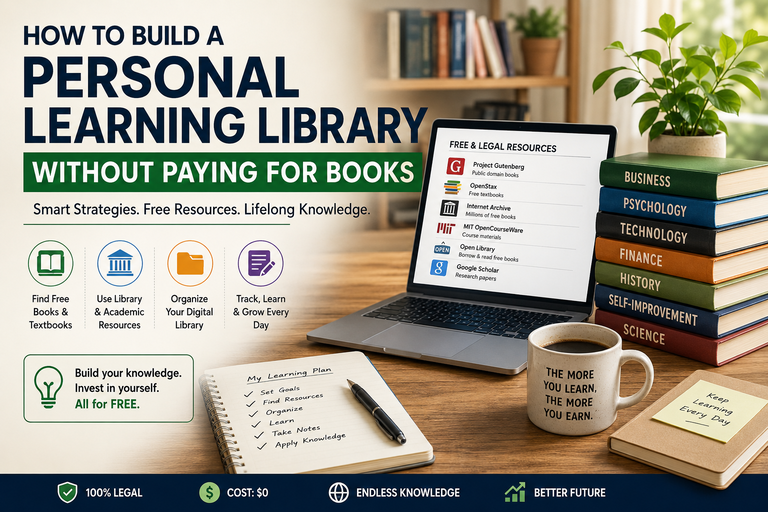
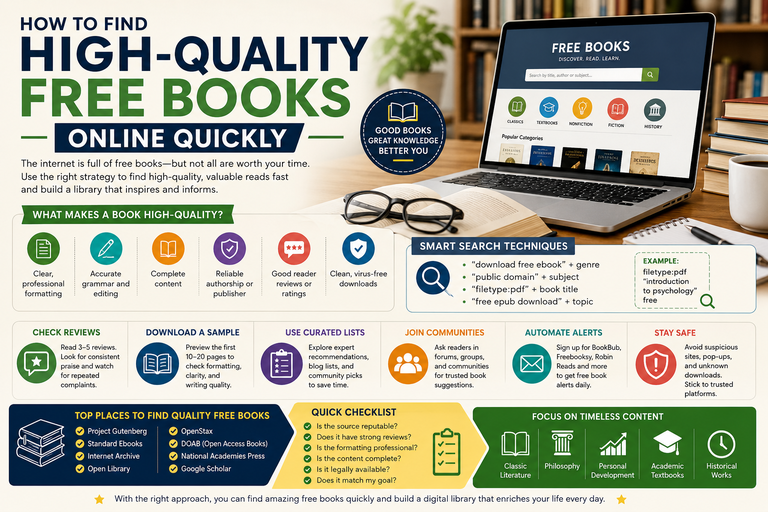
A sustainable digital library must be built using legal sources. Fortunately, thousands of high-quality academic materials are freely available.

A. Public Domain Books

Public domain books are completely free to download and use.

Reliable sources include:

  • Project Gutenberg – One of the largest collections of classic books

  • Internet Archive – Millions of digitized books and lendable texts

  • HathiTrust – Massive academic repository with public domain works

  • Wikisource – Free historical texts

  • Standard Ebooks – Beautifully formatted classic literature

These sources are excellent for history, philosophy, literature, and classic scholarship.


B. Open Access Research Papers

Many scientific papers are legally available through open access publishing.

Key platforms include:

  • Directory of Open Access Journals (DOAJ)

  • PubMed Central for biomedical research

  • arXiv, bioRxiv, medRxiv, and SSRN for preprints

  • CORE, which aggregates open access papers

  • OpenAlex for academic discovery

You can also use Google Scholar and look for the [PDF] link on the right side of search results. These often lead to legal author-uploaded versions.


C. Open Educational Resources (Free Textbooks)

Many universities publish free textbooks and course materials.

Examples include:

  • OpenStax – widely used free college textbooks

  • MIT OpenCourseWare – lecture notes, exams, and reading lists

  • OER Commons – community open learning resources

  • LibreTexts – especially strong for STEM subjects

  • Open Textbook Library

These resources can replace expensive textbooks for many courses.


D. Use Your University Library Access

Students often overlook resources they already have.

Most universities provide access to:

  • Subscription journal databases

  • Ebook collections

  • Interlibrary loan (ILL) services

  • Course reserve materials

Always access these using your library proxy or campus VPN when off campus.


E. Ask Authors Directly

Many researchers are happy to share their work if you email politely.

A short message like:

“Hello Professor, I’m a student studying this topic and would greatly appreciate a copy of your paper for personal study.”

Often works surprisingly well.


F. Add Your Own Study Materials

Your digital library should also include your personal academic resources:

  • Lecture slides

  • Lab manuals

  • Assignment instructions

  • Rubrics

  • Personal notes

These become extremely valuable during exam revision.


⚠️ Avoid pirated textbooks or “shadow library” downloads.

Besides legal issues, these files often contain:

  • Malware risks

  • Poor formatting

  • Broken metadata

They can also violate academic integrity policies.


3. Choose Your Free Tool Stack

You can build a powerful digital library using only two core tools, with optional additions.


Core Tool #1: Zotero

Zotero is a free reference manager widely used by students and researchers.

What it does well:

  • One-click citation imports from academic websites

  • Stores metadata (authors, journal, DOI)

  • Attaches PDFs automatically

  • Generates citations and bibliographies

  • Organizes sources into collections

Install:

  • Zotero desktop app

  • Zotero browser connector

Together, they create a complete research workflow.


Core Tool #2: A Library Folder on Your Computer

Even if you use Zotero, always maintain a clear file folder system.

This ensures:

  • You control your files

  • Easy backups

  • Independence from any single app

Think of it as the ground truth of your digital library.


Optional Tool: Calibre

Calibre is excellent if you collect many EPUB or MOBI ebooks.

It allows:

  • Ebook conversion

  • Device syncing

  • Metadata editing

  • Ebook organization


Optional Tool: Obsidian

If you want your reading notes to become long-term knowledge, Obsidian is ideal.

It stores notes as simple Markdown files and allows powerful linking between ideas.


Optional PDF Annotation Tools

Free options include:

  • Okular (Windows/Linux)

  • Xournal++ (handwritten notes on PDFs)

  • PDF-XChange Editor (Windows)

  • Apple Preview (Mac)


4. Design a Folder Structure You Won’t Regret

A simple structure prevents chaos later.

Example structure:

Digital Library/
00_Inbox/
01_School/
CourseName_2026_Spring/
Lectures/
Readings/
Assignments/
02_Research/
Topic_A/
Topic_B/
03_Books/
Nonfiction/
Fiction/
04_Reference/
Dictionaries_Handbooks/
99_Archive/

The Inbox Rule

Everything new goes into 00_Inbox first.

Once a week you:

  • Rename files

  • Add metadata

  • Move them to the correct folder

This prevents your downloads folder from becoming a disaster.


5. Create a Consistent File Naming System

Good filenames make files searchable even outside your apps.

Recommended format:

AuthorYear – Short Title (Source).pdf

Examples:

  • Kahneman2011 – Thinking Fast and Slow (Book).pdf

  • Smith2023 – CRISPR Ethics in Clinical Trials (Nature).pdf

For multiple authors:

Smith et al 2023 – Title.pdf

For lecture materials:

CourseCode Week03 – Topic – Slides.pdf

Best practices:

  • Keep filenames under 120 characters

  • Avoid symbols like : * ? " < > |

  • Maintain consistent spacing


6. Build Your Zotero Library Properly

A good Zotero workflow saves hours during research.

Step-by-Step

  1. Install Zotero and the browser connector

  2. Create Collections for:

    • Each course

    • Research topics

    • Thesis or capstone projects

  3. When you find a source:

    • Use the connector to save it

    • Attach the PDF

    • Add tags if needed

    • Write a short note explaining why you saved it


Smart Zotero Tips

  • Import items using DOI whenever possible

  • Use the Duplicate Items tool to merge duplicates

  • Create a tag like “To Read” to track reading progress


7. Make Scanned Documents Searchable (OCR)

Scanned PDFs are useless if they cannot be searched.

Use OCR (Optical Character Recognition) to convert scanned images into searchable text.

Free tools include:

  • Tesseract OCR

  • OCRmyPDF

  • Scanner apps with built-in OCR

After OCR, you can search scanned documents just like regular PDFs.


8. Create a Reading and Note-Taking Pipeline

A digital library only helps if it feeds your studying.

Use a three-stage reading system.

1. Capture

Save resources into Zotero or your Inbox folder.

2. Process

Rename files, fix metadata, and skim the document.

Write a few bullet points about why it matters.

3. Synthesize

Convert highlights into notes you can use for essays, exams, or research.


Simple Literature Note Template

Include:

  • Citation

  • 3–5 key claims

  • Important evidence

  • Your critique or questions

  • Possible use in essays

If using Obsidian, create one note per paper and link related topics.


9. Backups and Syncing

Your digital library must be protected.

Follow the 3-2-1 backup rule:

  • 3 copies of important data

  • 2 different storage types

  • 1 off-site copy

Example setup:

  • Laptop

  • External hard drive

  • Cloud backup (Google Drive, OneDrive, iCloud)


Zotero Storage Tip

You can sync metadata for free while keeping PDFs locally.

Back up your Zotero library folder regularly.


10. Make Your Library Easy to Search

Use multiple search layers.

OS Search

Windows Search or macOS Spotlight works well if filenames are standardized.

Zotero Search

Finds sources using metadata, tags, and notes.

Full-Text Search

Works on PDFs that have OCR applied.


11. Maintain It with a Weekly 20-Minute Routine

Digital libraries fail when they become messy.

Once a week:

  • Empty your Inbox folder

  • Merge duplicates in Zotero

  • Tag reading status

  • OCR new scans

  • Run backups

This quick routine keeps everything organized.


12. Create a Personal Syllabus for Each Course

For every course, build a single hub document containing:

  • The syllabus

  • Key readings from your library

  • Lecture outlines

  • Exam topics

  • Summary sheets

This transforms your library from storage into a study system.


13. Optional Upgrades (Still Free)

Research Alerts

Automatically discover new papers using:

  • Google Scholar alerts

  • Journal RSS feeds

  • arXiv topic feeds


Build a Quote Bank

Save useful quotes with page numbers for essays and research writing.

This dramatically speeds up writing.


Citation Hygiene

Always capture:

  • Author names

  • Publication year

  • Title

  • Source or publisher

  • DOI or URL

  • Page numbers for quotes


14. Legal and Ethical Guardrails

A responsible digital library respects copyright.

Follow these principles:

  • Use public domain and open access resources

  • Avoid sharing copyrighted PDFs publicly

  • Do not upload textbooks to shared drives

  • Follow your university library guidelines

If unsure, ask a librarian.


A Complete Starter Plan (Build It in One Weekend)

Day 1 – Setup

  • Install Zotero and the browser connector

  • Create your folder structure

  • Create Zotero collections for courses

  • Define filename rules

Day 2 – Populate

  • Import syllabus readings

  • Add 10–20 key papers or books

  • Start tagging items “To Read”

Day 3 – Secure

  • Set up backups

  • OCR scanned materials

  • Create hub notes for each course


Recommended Free Digital Library Stack

Zotero
For citations, metadata, and PDF management.

Library Folder
Your permanent organized file storage.

Okular / Preview / Xournal++
For reading and annotating PDFs.

OCRmyPDF (optional)
For searchable scanned documents.

Obsidian (optional)
For building a long-term knowledge system.


Final Thoughts

A well-designed digital library becomes more powerful every semester. Instead of constantly searching for materials again, you build a growing personal archive of knowledge.

Over time, your library evolves into:

  • A research database

  • A study system

  • A writing assistant

  • A lifelong learning resource

Start simple, keep it organized, and maintain it weekly. Within a year, you’ll have something most students never build: a personal knowledge library that supports your entire academic journey.

Search

Trending Books