How to Build a Personal Digital Library (Free, Legal & Organized)
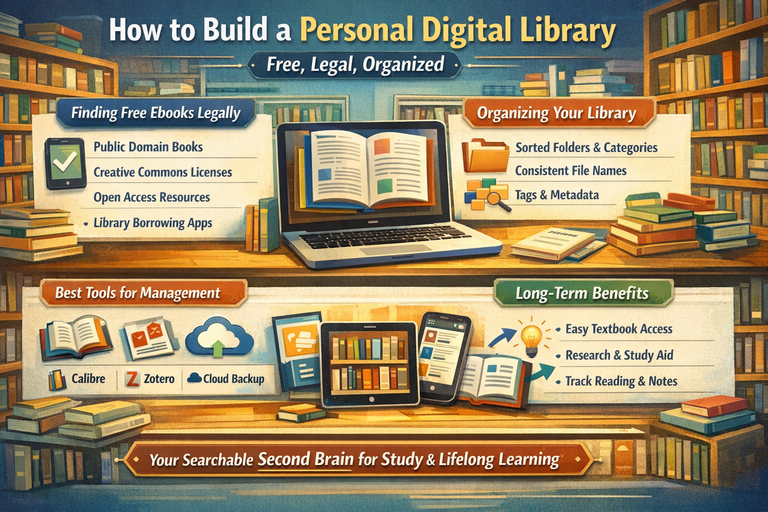
A personal digital library is one of the most powerful long-term assets you can build as a student, researcher, or serious reader. Unlike scattered downloads or bookmarked links, a well-designed digital library becomes your searchable second brain a place where textbooks, reference materials, research papers, notes, and favorite books live together in a system you can trust.
When done right, your digital library:
-
Saves money on textbooks and reference materials
-
Eliminates frantic searching before exams or deadlines
-
Grows more valuable over time instead of becoming cluttered
-
Travels with you across devices and life stages
This guide focuses on four practical areas:
-
Finding free ebooks legally (without guesswork)
-
Organizing PDFs and ebooks so they stay usable
-
The best tools for managing digital libraries
-
How students and readers use digital libraries long-term and why the system works
1) Finding Free Ebooks Legally (Without Guesswork)
One of the biggest mistakes people make when building a digital library is assuming that “free to download” means legal. In reality, many sites host copyrighted books without permission, which can lead to broken links, removed files, or ethical and legal issues later.
If your goal is a library you can keep forever, legality matters.
A. The 5 legitimate ways books are legally free
Understanding why a book is free makes it easier to trust your sources.
-
Public domain
Copyright has expired. Anyone can download, share, and keep the book permanently.
Examples: classic literature, early academic works. -
Creative Commons or open licenses
The author or publisher explicitly allows free distribution under licenses like CC BY or CC BY-SA. -
Open-access books
Universities or publishers release full books for free, often as PDFs or EPUBs, especially textbooks and academic titles. -
Author-approved giveaways
Authors legally distribute their work through personal websites, newsletters, or promotional platforms. -
Library lending
Digital borrowing is legal but time-limited. Great for reading, not ideal for permanent archiving.
Rule of thumb: If a modern bestseller is “free” with no explanation of licensing or permission, it’s a red flag.
B. Reliable places to get free, legal ebooks
These sources are evergreen and widely trusted.
Public-domain classics
-
Project Gutenberg – The gold standard for public-domain books
-
Standard Ebooks – Professionally formatted, typo-corrected classics
-
Google Books (Public Domain filter)
-
Internet Archive – Public-domain books and borrowable scans
Open textbooks (excellent for students)
-
OpenStax – Peer-reviewed college textbooks
-
Open Textbook Library
-
OER Commons
-
Saylor Academy – Open educational resources and course texts
Open-access academic books
-
DOAB (Directory of Open Access Books)
-
OAPEN
-
University press open-access catalogs (varies by institution)
Research papers and technical reading
-
arXiv, PubMed Central, SSRN (field-dependent)
-
University repositories (theses, dissertations, working papers)
Library borrowing platforms
-
Libby/OverDrive, Hoopla (availability depends on region and library membership)
C. Where JunkyBooks fits in (discovery + convenience)
Many students and general readers use JunkyBooks to discover free ebooks by category—study skills, communication, productivity, fiction, and more.
The smartest way to use it is:
-
Treat JunkyBooks as a discovery tool, not a final authority
-
Prioritize titles that clearly state public-domain or open licenses
-
Cross-check unfamiliar titles on trusted platforms like Project Gutenberg, OpenStax, DOAB, OAPEN, or your library
This approach gives you convenience without compromising legality.
D. The 30-second legality checklist
Before downloading, quickly ask:
-
Does the page clearly say Public Domain or Creative Commons?
-
Is it hosted by a university, publisher, library, or reputable archive?
-
Is the author or publisher explicitly granting permission?
-
Is it a library loan (legal but time-limited)?
If none of these are clear, skip it. There will always be better sources.
2) Organizing PDFs and Ebooks by Subject (So You Can Actually Find Things)
A digital library only works if you can find what you need in seconds. Without a system, even great books become invisible.
A. Choose your organization style
-
Folder-based: Simple, universal, and cloud-friendly
-
App-based: Powerful search, metadata, and tracking
-
Hybrid (recommended): Clean folders + management apps
The hybrid approach gives you flexibility and future-proofing.
B. A folder structure that scales
Start broad, then refine.
Key habit: Everything goes into 00_Inbox first. You sort later, intentionally.
C. Use a consistent file-naming system
Clear names make files searchable even outside library apps.
Recommended format:
Examples:
-
Dewey – How We Think (1910).pdf
-
McLean – Business Communication for Success (2015).pdf
Avoid chaotic names like final_FINAL_v3.pdf.
D. Organize by subject and by intent
Subjects are useful, but intent reflects real usage.
-
Learn – Skills you’re actively developing
-
Reference – Materials you’ll search, not read cover-to-cover
-
Research – Papers, theses, source material
-
Leisure – Fiction and personal reading
This mirrors how people actually use libraries long-term.
E. Tags and metadata: where libraries become powerful
Folders help you store. Tags help you retrieve.
Useful tags include:
-
Beginner / Intermediate / Advanced
-
Exam / Thesis / Presentation
-
To Read / Reading / Finished
-
Core / Optional
Tools like Calibre and Zotero make this effortless.
3) Best Apps and Tools for Managing a Digital Library
No single app does everything perfectly. The best systems combine tools.
A. Calibre (best overall for ebooks)
Best for: EPUB, MOBI, AZW3, and book-style PDFs
Why people love it:
-
Full library database (authors, series, tags, ratings)
-
Format conversion
-
Cover management and metadata cleanup
Tip: Use Calibre for books not academic papers.
B. Zotero (essential for students and researchers)
Best for: PDFs, journal articles, citations
Why it’s indispensable:
-
Automatically extracts metadata
-
Tags, notes, annotations, and full-text search
-
Citation and bibliography generation
Common collections:
-
Course – Semester
-
Thesis – Chapter
-
Topic-based folders
C. Reading apps (day-to-day use)
Choose based on device and annotation needs:
-
Apple Books – Clean and simple
-
Google Play Books – Android-friendly; easy uploads
-
Kindle app + Send to Kindle – Excellent syncing
-
KOReader – Power users and e-ink readers
-
Moon+ Reader (Android) – Highly customizable
D. Backup and cloud storage (non-negotiable)
At minimum:
-
Store your library in Google Drive, Dropbox, OneDrive, or iCloud
-
Keep an offline copy on an external drive
Best practice: 3-2-1 rule
-
3 copies
-
2 different storage types
-
1 offsite
4) How Students and Readers Use Digital Libraries Long-Term
The real value of a digital library appears over time.
A. A sustainable long-term workflow
-
Discover (JunkyBooks, OER sites, libraries)
-
Download to Inbox
-
Import into Calibre or Zotero
-
Rename and tag (2 minutes)
-
Read and highlight
-
Summarize (optional but powerful)
-
Monthly review
B. How students benefit
Students use digital libraries to:
-
Keep textbooks searchable
-
Reuse sources across semesters
-
Build thesis references early
-
Improve writing and presentations
-
Reduce deadline stress
C. How general readers benefit
Long-term readers use libraries to:
-
Curate knowledge by topic
-
Revisit highlights and notes
-
Track reading history
-
Create personal learning paths
D. The compounding effect
A well-organized digital library compounds because:
-
Each new book fits into an existing system
-
Notes and highlights form a personal knowledge base
-
Less time is wasted searching
Once built, it keeps paying you back.
Practical Setup: One-Afternoon Starter Plan
-
Create folders:
Digital Library/00_Inbox,Books,Textbooks,Papers -
Install Calibre and Zotero
-
Choose one cloud storage location
-
Download 10–20 legal free ebooks
-
Rename and tag before adding more
You’ll immediately feel the difference between having files and having a usable library.
Final Thoughts
Building a personal digital library free, legal, and organized is one of the smartest habits students and lifelong learners can develop. With trusted sources, a simple system, and the right tools, your library becomes a durable knowledge asset that grows with you.
And if you want an easy way to discover free reading across skills and subjects, JunkyBooks can be a helpful starting point just pair discovery with basic license checks to keep your library ethical, legal, and future-proof.