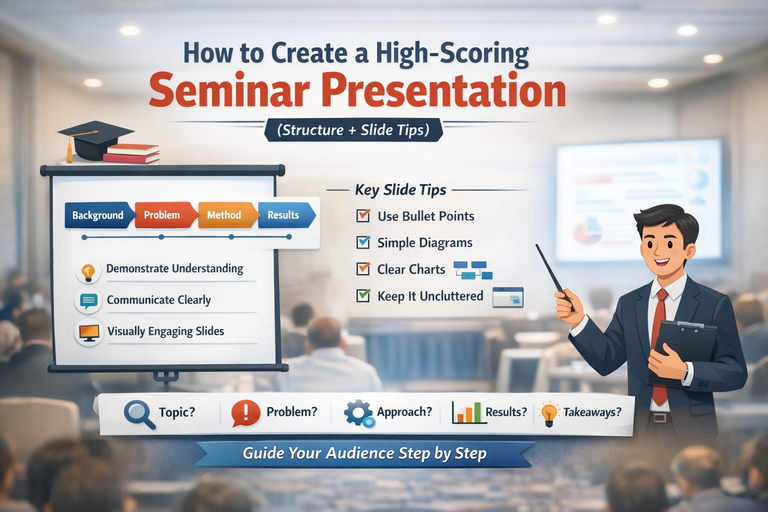
How to Create a High-Scoring Seminar Presentation (Clear Structure + Smart Slide Design Tips)
A seminar presentation is more than a requirement it is a test of how well you understand your topic, how logically you can organize ideas, and how effectively you can communicate research to an audience. Even strong projects can score poorly if the presentation lacks structure, clarity, or visual discipline.
Many students assume that seminars are about putting “everything” on slides. In reality, high-scoring seminar presentations focus on guiding the audience through a clear academic story:
background → problem → approach → evidence → meaning.
When this flow is missing, audiences get confused, examiners lose interest, and key contributions are overlooked—no matter how good the work actually is.
This guide walks you through:
-
The ideal seminar presentation structure
-
What to include on each slide
-
Practical, examiner-friendly slide design tips
-
Common mistakes that reduce marks and how to avoid them
If your goal is clarity, confidence, and strong grades, this framework will help you deliver.
What Makes a Strong Seminar Presentation?
A high-quality seminar presentation consistently achieves three core goals.
1) Demonstrates Strong Subject Understanding
Examiners and audiences should feel confident that you:
-
Understand the topic accurately and deeply
-
Used appropriate methods or approaches
-
Relied on credible, up-to-date sources
This does not mean showing everything you read or every calculation you performed. Strong presentations are selective. They highlight what matters most, explain it clearly, and show that decisions were made intentionally.
Depth is demonstrated through clarity, not volume.
2) Communicates Clearly and Logically
Clear communication depends on:
-
A simple, logical narrative flow
-
Smooth transitions between sections
-
Emphasis on key points rather than excessive detail
Once an audience gets confused, they mentally disengage and it is difficult to win them back. Your job is to make the presentation easy to follow even for someone unfamiliar with your topic.
If listeners can summarize your work after the presentation, you succeeded.
3) Looks Easy to Follow Visually
Professional seminar slides:
-
Reduce cognitive load
-
Highlight key ideas
-
Support not to replace your spoken explanation
Good design is not about flashy animations or colorful templates. It is about intentional simplicity, consistent structure, and readability.
A useful way to frame your seminar is as a short academic story:
-
What is the topic?
-
What problem or gap exists?
-
What did you do?
-
What did you find?
-
Why does it matter?
If your presentation answers these five questions clearly, you are on the right path.
Ideal Seminar Presentation Structure (Slide-by-Slide)
This structure works for most academic, technical, and project-based seminars. You can adjust depth depending on your time limit or discipline.
1) Title Slide
Purpose: Introduce the topic and establish credibility immediately.
Include:
-
Clear, specific seminar title
-
Your full name
-
Course, department, or program
-
Institution
-
Supervisor/guide (if required)
-
Date
-
Optional institutional logo (small and unobtrusive)
Avoid:
Generic titles such as “Seminar on Artificial Intelligence”.
Instead, use titles that signal focus and direction, for example:
-
“A Comparative Study of Machine Learning Models for Credit Risk Prediction”
-
“Design and Implementation of an IoT-Based Smart Irrigation System”
Your title shapes expectations. Make it informative, not vague.
2) Introduction
Purpose: Bring everyone to the same starting point.
Include:
-
Brief background or context (2–4 bullet points)
-
Why the topic matters (real-world relevance, academic importance, industry need)
-
Key terms or concepts (only if the audience may not know them)
What to avoid:
-
Long historical explanations
-
Full literature reviews
-
Dense paragraphs
Good benchmark:
Your audience should understand what the topic is and why it matters within one minute.
3) Problem Statement
Purpose: Clearly define the specific problem your seminar addresses.
This is one of the most critical slides in the entire presentation. A weak problem statement leads to an unfocused seminar.
Include:
-
The core problem in 1–2 precise sentences
-
Who or what it affects (users, systems, organizations, environment, society)
-
Evidence that the problem exists, such as:
-
Statistics
-
Observed limitations
-
Research gaps
-
Optional:
-
Constraints (time, cost, data, hardware)
-
Assumptions made during the study
Useful phrasing templates:
-
“Current approaches fail to ___ when ___.”
-
“There is a gap in existing research regarding ___.”
-
“The challenge lies in ___, resulting in ___.”
If this slide is unclear, everything that follows will feel disconnected.
4) Objectives
Purpose: Tell the audience exactly what you aimed to achieve.
Include:
-
3–5 clearly defined objectives
-
Measurable action verbs:
analyze, design, develop, compare, evaluate, assess, measure -
Optional scope boundaries (what the study does not cover)
Example formats:
-
“To evaluate the performance of ___ using ___ metrics.”
-
“To compare ___ and ___ under ___ conditions.”
-
“To design and implement a system that ___.”
Each objective should link directly to:
-
a method
-
a result
-
a conclusion
Ideally, there is a one-to-one relationship.
5) Methodology
Purpose: Explain how you approached the problem.
This section often determines whether your audience trusts your results.
Depending on your field, include:
-
Research design (experiment, survey, case study, simulation, system design)
-
Data sources (datasets, participants, tools)
-
Workflow or procedure (high-level steps)
-
Evaluation metrics (accuracy, efficiency, cost, time, error rate)
-
Tools, software, or technologies used
Best practice:
Use visuals instead of heavy text:
-
Flowcharts
-
System architecture diagrams
-
Pipelines
-
Block diagrams
Your methodology should be clear enough that someone could reproduce it at a high level.
6) Findings (Results)
Purpose: Present what you discovered—clearly, accurately, and honestly.
Include:
-
Results aligned with each objective
-
Visuals (charts, simplified tables, screenshots)
-
Clearly labeled values, units, and axes
-
Brief interpretation of what each result means
Strong results slide pattern:
-
Slide title: conclusion-style headline
(e.g., “Model A reduced prediction error by 18%”) -
Center: visual evidence
-
Bottom/side: 2–3 bullets interpreting the result
Avoid:
-
Raw data dumps
-
Overcrowded tables
-
Results with no explanation
If you have many results, group them into themes and keep extra data in backup slides.
7) Conclusion
Purpose: End with clarity and impact not repetition.
A conclusion is not a slide-by-slide summary.
Include:
-
3–5 key takeaways
-
Confirmation of whether objectives were met
-
Practical or academic implications
-
Limitations (brief and honest)
-
Future work or recommendations (if applicable)
Effective closing structure:
Takeaway → Evidence → Impact
Example:
“We achieved ___, supported by ___, enabling ___.”
Your audience should leave knowing why your work matters.
8) References
Purpose: Demonstrate academic credibility and integrity.
Include:
-
Key sources only (not everything you read)
-
Consistent citation style (APA, IEEE, MLA follow department rules)
-
Clean, readable formatting
You may also include brief in-slide citations such as (Author, Year) or [3], with full details on the references slide.
Slide Design Tips (That Actually Improve Marks)
1) Use Bullet Points, Not Paragraphs
-
3–5 bullets per slide
-
One line per bullet where possible
-
Slides support your speech they do not replace it
If it reads like a report, it belongs in your report.
2) Avoid Long Blocks of Text
Long paragraphs cause two problems:
-
The audience reads instead of listening
-
You end up reading slides aloud
Fix this by:
-
One idea per slide
-
Using diagrams instead of text
-
Moving details into speaker notes
3) Use Diagrams Wherever Possible
Visuals improve understanding and recall.
Best visuals:
-
Flowcharts → methodology
-
Architecture diagrams → systems
-
Graphs → results
-
Timelines → development stages
Always label axes, units, legends, and categories.
4) Keep Slides Simple
Simplicity signals professionalism.
Clean slide checklist:
-
One idea per slide
-
Consistent layout
-
High contrast
-
Plenty of white space
-
Minimal animations (only to reveal steps)
Practical Formatting Guidelines (Quick Standards)
-
Title font: 32–44 pt
-
Body font: 20–28 pt (never below 18)
-
Fonts: Calibri, Arial, Helvetica
-
Colors: 2–3 maximum
-
Alignment: left-aligned text
-
Images: high resolution, not stretched
-
Charts: clean 2D bar/line charts (avoid 3D)
How Many Slides Should a Seminar Have?
A reliable rule:
~1 slide per minute
(or 1 slide per 1.5 minutes for content-heavy slides)
Examples:
-
10 minutes → 8–12 slides
-
15 minutes → 10–15 slides
-
20 minutes → 12–18 slides
Quality always beats quantity.
Public Speaking Tips (So You Don’t Just Read Slides)
-
Open with a hook (question, statistic, scenario)
-
Signpost your structure early (“First…, then…, finally…”)
-
Pause after key results
-
Maintain eye contact with the audience
-
Practice transitions between sections
-
Prepare answers to at least five likely questions
Strong delivery can significantly elevate an average presentation.
Simple Seminar Slide Template (Copy-Paste Outline)
-
Title
-
Introduction / Background
-
Problem Statement
-
Objectives + Scope
-
Methodology Overview (diagram)
-
Methodology Details
-
Findings 1
-
Findings 2
-
Conclusion
-
References
-
Backup slides (optional)
Final Checklist Before You Present
-
Does each slide have a clear purpose?
-
Is the flow understandable without reading paragraphs?
-
Are the problem and objectives specific and measurable?
-
Do findings connect directly to objectives?
-
Are visuals readable from the back of the room?
-
Does the conclusion emphasize takeaways, not repetition?
-
Have you practiced at least twice with a timer?
A well-structured seminar does more than share information it builds confidence in your work, your reasoning, and your conclusions. When structure, clarity, and design work together, strong grades follow