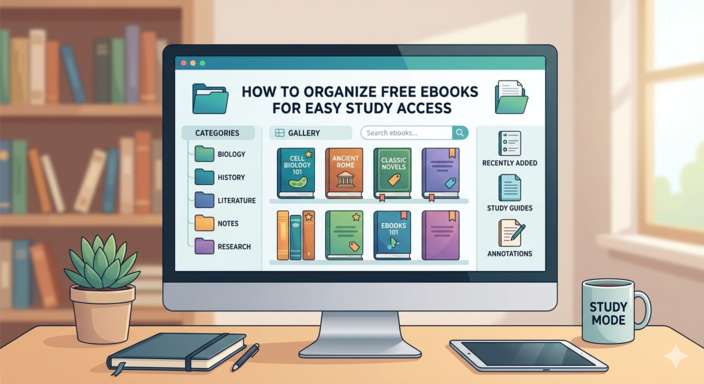
How to Organize Free eBooks for Easy Study Access
Downloading free eBooks is easy. Keeping them organized for efficient study? That’s where most people struggle.
If your phone, tablet, or laptop is filled with random files named things like:
book_final_v2_REAL.pdf
you’re definitely not alone.
Disorganized eBooks create unnecessary stress. You waste time searching for files, forget where important materials are stored, and lose focus before you even begin studying.
The good news is that organizing your digital books doesn’t have to be complicated.
With the right system, you can build a clean, searchable, and highly efficient digital library that makes studying faster and easier.
This guide explains step-by-step how to organize free eBooks for easy study access across your phone, tablet, or computer.
Why Organizing eBooks Matters
Most people underestimate how much digital clutter affects productivity.
When your books are properly organized:
- ✅ You find materials instantly
- ✅ You reduce study friction
- ✅ You stay focused longer
- ✅ You retain information better
- ✅ You avoid duplicate downloads
- ✅ You build a long-term knowledge system
A well-organized library improves learning efficiency because your brain spends less time searching and more time processing information.
Think of it this way:
A messy digital library creates mental clutter.
A clean digital library creates learning momentum.
Step 1: Choose One Main Storage Location
The first rule of ebook organization is simple:
Stop saving books everywhere.
Many people store books:
- In Downloads
- On Desktop
- In WhatsApp folders
- Across multiple drives
- Inside random apps
This quickly becomes chaotic.
Best Storage Options
Choose one primary system for all your ebooks.
Good options include:
- Google Drive
- Dropbox
- OneDrive
- iCloud Drive
- A dedicated folder on your laptop
- Your ebook app library
Why Cloud Storage Is Best
Cloud storage offers major advantages:
- Access books from any device
- Automatic syncing
- Easy backup
- Reduced risk of losing files
- Better organization across platforms
If your phone or laptop gets damaged, your library stays safe.
Step 2: Create a Simple Folder Structure
One of the biggest mistakes people make is creating overly complicated folder systems.
Keep your structure simple and practical.
Recommended Folder Structure
Example:
eBooks/
   ├── Business
   ├── Psychology
   ├── Programming
   ├── History
   ├── Language_Learning
   └── Exam_Preparation
This system works because it’s:
- Easy to navigate
- Easy to maintain
- Scalable over time
Add Subfolders Only When Necessary
If a category grows too large, create simple subfolders.
Example:
Programming/
   ├── Python
   ├── Web_Development
   └── Data_Science
Avoid creating deeply nested folders unless absolutely necessary.
Too many layers slow you down.
Step 3: Rename Files Properly
This is one of the most important steps.
Most downloaded ebooks have terrible filenames.
Examples:
ebook_2398472.pdf
book_new_final2.pdf
scan_copy_latest.pdf
These names become impossible to search later.
Use a Consistent Naming System
Recommended format:
BookTitle_Author_Year.pdf
Example:
Deep_Work_Cal_Newport_2016.pdf
Benefits:
- Faster searching
- Cleaner library
- Easier sorting
- Better indexing
Once your files are named properly, finding books takes seconds instead of minutes.
Step 4: Standardize Your Book Formats
Using too many file types creates unnecessary confusion.
Try to standardize your ebook collection whenever possible.
Best Formats for Studying
✅ EPUB
Best for:
- Adjustable text
- Mobile reading
- Long reading sessions
Advantages:
- Responsive formatting
- Easier on the eyes
- Better for phones and tablets
✅ PDF
Best for:
- Textbooks
- Scanned books
- Academic papers
- Diagrams and charts
PDFs preserve original formatting but may be less flexible on small screens.
Avoid Too Many Formats
Managing:
- EPUB
- MOBI
- AZW
- TXT
- DOCX
all together can become messy.
Keep your library as consistent as possible.
Step 5: Use an eBook Management Tool
If you own dozens or hundreds of ebooks, a dedicated ebook manager becomes extremely useful.
Calibre (Best Free Option)
Calibre is one of the best free ebook management tools available.
It transforms scattered files into a searchable digital library.
What Calibre Can Do
With Calibre, you can:
- Organize books by title and author
- Add categories and tags
- Search instantly
- Convert formats
- Edit metadata
- Transfer books to devices
- Create collections
For serious learners, it is incredibly valuable.
Step 6: Use Tags for Faster Access
Folders are useful, but tags make organization even more powerful.
Tags allow books to belong to multiple categories simultaneously.
Useful Study Tags
Examples include:
- Exam
- Research
- Beginner
- Advanced
- Important
- Revision
- Thesis
- 2026 Curriculum
Example Tag System
A psychology book might include tags like:
- Psychology
- Cognitive Science
- Exam Prep
- Research Notes
Now you can instantly filter your library without opening multiple folders.
Apps That Support Tags and Collections
Many reading platforms allow tagging and categorization.
Examples:
This dramatically improves navigation.
Step 7: Organize Inside Your Reading App
Your reading app itself should also stay organized.
Most ebook apps support:
- Collections
- Categories
- Favorites
- Reading lists
Example Kindle Collections
Create collections such as:
- Currently Studying
- To Read
- Completed
- Revision
- Research Materials
This keeps your active study materials separate from everything else.
Example Apple Books Collections
In Apple Books, you can:
- Create custom collections
- Sort by title or author
- Mark favorites
- Separate academic and personal reading
This improves workflow and reduces distractions.
Step 8: Create a “Currently Studying†Folder
One of the simplest productivity tricks is separating active study materials from archived books.
Create a folder like this:
Currently_Studying/
Only place books you are actively using there.
Why This Helps
When your active materials are isolated:
- You avoid clutter
- You reduce overwhelm
- You focus faster
- You know exactly what matters now
Once finished:
-
Move books to “Completedâ€
or - Return them to their subject folders
Step 9: Use Highlights and Notes Strategically
Organization isn’t just about files.
It’s also about retrieving information quickly.
Use a Highlighting System
Example:
- Yellow → Important concepts
- Blue → Definitions
- Green → Examples
- Pink → Exam-relevant points
A consistent system makes review much faster later.
Add Short Notes
Instead of highlighting everything:
- Summarize key ideas briefly
- Add reminders
- Write questions
- Mark difficult concepts
This improves active learning and retention.
Export Your Highlights
Some apps allow exporting:
- Notes
- Highlights
- Annotations
This becomes extremely useful during:
- Exam revision
- Research writing
- Thesis preparation
Step 10: Back Up Everything
Never rely on one device alone.
Hard drives fail.
Phones break.
Files get deleted accidentally.
Always maintain backups.
Best Backup Methods
Automatic Cloud Sync
The easiest solution.
External Hard Drive
Useful for large collections.
Monthly Backup Routine
Set a monthly reminder to:
- Export notes
- Backup folders
- Check duplicates
Prevention is easier than rebuilding your library.
Step 11: Create a Master eBook Index (Optional but Powerful)
If you study heavily or conduct research, create a searchable index.
A simple spreadsheet works perfectly.
Recommended Columns
| Title | Author | Subject | Format | Notes |
|---|
You can also include:
- Reading status
- Difficulty level
- Priority
- Source link
Why an Index Helps
This becomes useful for:
- Academic research
- Thesis work
- Competitive exams
- Long-term learning projects
Your spreadsheet becomes a searchable knowledge database.
Step 12: Remove What You Don’t Need
Digital clutter is still clutter.
Many people download hundreds of books they never read.
This creates:
- Decision fatigue
- Storage problems
- Disorganization
Clean Your Library Regularly
Every few months:
- Delete duplicates
- Remove low-quality files
- Archive outdated materials
- Organize unfinished downloads
A smaller, cleaner library is easier to use.
Example of a Clean eBook System
Example structure:
eBooks/
   ├── Business/
   ├── Psychology/
   ├── Programming/
   ├── Exam_Prep/
   ├── Completed/
   └── Currently_Studying/
Inside your reading app:
Collection: 2026_Exams
Collection: Research
Collection: Revision
This setup provides near-instant access to your materials.
Common Mistakes to Avoid
Avoid these common organization problems:
⌠Saving books randomly in Downloads
⌠Never renaming files
⌠Mixing entertainment and study books
⌠Keeping hundreds of unused ebooks
⌠No backup system
⌠Overcomplicated folders
⌠Ignoring metadata and tags
Simple systems work best.
The 10-Minute Fast Setup Method
If you want a quick system, do this:
Step 1
Create one main folder:
eBooks/
Step 2
Create 5–7 subject folders.
Step 3
Rename files properly.
Step 4
Create:
Currently_Studying/
Step 5
Sync everything with:
Step 6
Install:
Done.
Final Thoughts
Organizing your free ebooks isn’t about perfection.
It’s about accessibility.
When your digital library is structured properly:
- You save time
- You reduce stress
- You improve study efficiency
- You retain information better
- You create a long-term learning system
Think of your ebook collection as your personal knowledge archive.
A little organization today can save you hundreds of hours in the future.
Set it up once.
Benefit from it for years.
Happy studying 📚