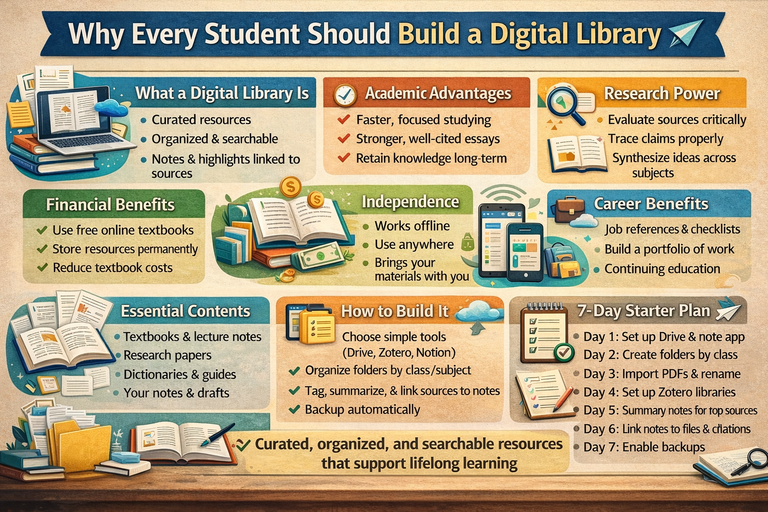
Why Every Student Should Build a Digital Library
A student’s most valuable asset isn’t a perfect planner or the latest device it’s a personal system for collecting, organizing, and revisiting knowledge. A digital library is exactly that: a curated, searchable collection of books, articles, notes, lecture materials, datasets, and references you can access anytime.
When built correctly, a digital library becomes more than storage. It transforms into a learning engine: reducing study time, improving research and writing quality, supporting long-term retention, and making education cheaper and more independent. Whether you’re in high school, university, or self-educating, creating a digital library is one of the smartest habits you can start today.
1) What a “Digital Library” Actually Is (and Isn’t)
A digital library is not just a folder called “School Stuff” filled with random PDFs.
A useful student digital library has:
-
Curated, trustworthy resources
-
Searchable content for fast retrieval
-
Organization by subject, course, and type
-
Metadata (titles, authors, tags, citations)
-
Notes and highlights linked to sources
-
Automatic backups
Think of it as your personal university library small, focused, and tailored to your learning goals.
2) Academic Advantage: Better Grades With Less Stress
Faster Studying
-
Reopen last semester’s notes in seconds
-
Review key chapters before exams without hunting links
-
Use highlights for spaced repetition
Stronger Assignments and Essays
-
Collect high-quality references early
-
Track quotes and page numbers accurately
-
Compare sources quickly
-
Cite properly to avoid plagiarism
Better Long-Term Learning
-
Store foundational concepts to prevent relearning the basics each year
3) Financial Benefits: Reduce Textbook Costs
A digital library helps you:
-
Use open textbooks (OER) and free online books
-
Retain older editions legally
-
Store lecture notes permanently
-
Build a reference collection reusable across multiple courses
4) Independence: Learn Without Waiting for Permission
A digital library:
-
Works offline and across devices
-
Travels with you wherever you go
-
Remains accessible after graduation
Perfect for students who commute, work while studying, or self-educate outside traditional systems. It’s also a safety net if a course is poorly taught.
5) Research Power: Build Information Literacy
A digital library encourages:
-
Source evaluation: keep credible sources, discard unreliable ones
-
Traceability: track claims to their origins
-
Synthesis: connect ideas across courses
-
Version control: store drafts and revisions
Over time, you become someone who builds understanding, not just searches for answers.
6) Career Benefits: Your Library as a Professional Knowledge Base
After graduation, your digital library evolves into:
-
A reference set for your job
-
A repository of templates, checklists, and best practices
-
A portfolio of research notes, essays, and projects
-
A lifelong learning system for certifications and skill upgrades
In competitive fields, a searchable personal library is a major advantage.
7) Accessibility and Personalization
Digital libraries can adapt to learning needs:
-
Adjustable fonts and screen readers
-
Text-to-speech for reading-heavy subjects
-
Dyslexia-friendly layouts
-
Translation tools for multilingual learners
This makes studying more inclusive and effective.
8) What to Include in a Student Digital Library
Core Learning Materials
-
Textbooks (open or purchased)
-
Lecture notes and slides
-
Worksheets and problem sets
-
Lab manuals and rubrics
Reference & Writing Tools
-
Dictionaries, style guides, citation manuals
-
Research methods and statistics guides
Research Sources
-
Journal articles, primary sources, government datasets
Your Own Outputs
-
Notes, summaries, mind maps
-
Essay drafts, final versions, projects, code
-
“Error logs” of corrections and revisions
Your personal outputs eventually become the most valuable part of your library.
9) How to Build a Digital Library
Step 1: Choose a Maintainable Tool Setup
-
File storage: Google Drive, OneDrive, Dropbox, iCloud
-
Reference manager: Zotero (free)
-
Notes: Obsidian, Notion, OneNote, Google Docs
-
PDF reader: supports highlights and annotations
Step 2: Create a Folder and Naming Structure
Example:
School/Year/Semester/Course/
Lectures/
Readings/
Assignments/
Exams/
My Notes/
File naming conventions:
-
Author_Year_Title.pdf -
CourseCode_Week03_LectureNotes.pdf -
EssayTopic_Draft2.docx
Step 3: Tag and Summarize
-
Add tags/keywords
-
Write 5–10 line summaries for major sources
-
Include key quotes and page numbers
-
Note potential use cases (exam, essay, project)
Step 4: Connect Notes to Sources
-
Link notes to PDFs, chapters, page numbers, or Zotero entries
-
Keeps your notes actionable and trustworthy
Step 5: Back Up Automatically
Follow the 3-2-1 rule:
-
3 copies
-
2 different media (cloud + local)
-
1 offsite (cloud counts)
10) Common Mistakes to Avoid
-
Saving everything: Only move quality resources into your library
-
No naming conventions: Use a standard structure and refine gradually
-
Notes separated from sources: Always include citations
-
No backups: Schedule cloud or local backups
-
Course-specific only: Include general references (writing, statistics, methods)
11) A 7-Day Starter Plan
-
Day 1: Choose tools (Drive + Zotero + notes app)
-
Day 2: Create folder structure for current semester
-
Day 3: Import PDFs, rename consistently
-
Day 4: Set up Zotero collections + browser connector
-
Day 5: Add summaries to top 5 sources
-
Day 6: Link notes to sources (pages + citations)
-
Day 7: Set up backups + weekly maintenance routine
Conclusion: Make Learning Cumulative
Education often feels like cramming, submitting, and forgetting. A digital library makes learning cumulative: every class adds knowledge and resources to a system you keep for years.
It saves time, reduces costs, improves research and writing, supports accessibility, and prepares you for lifelong learning. Most importantly, it gives ownership of your education, something no grade or course can replace