Best Apps for Reading Free PDF Books on Mobile Devices
The rise of digital reading has transformed the way people access books, academic resources, research papers, manuals, and professional documents. Among the many digital formats available today, PDF (Portable Document Format) remains one of the most widely used due to its consistency across devices and its ability to preserve original formatting.
Whether you're a student downloading free textbooks, a researcher reviewing scholarly articles, a professional reading reports, or simply someone enjoying free eBooks, having the right PDF reading app on your mobile device can greatly enhance your experience.
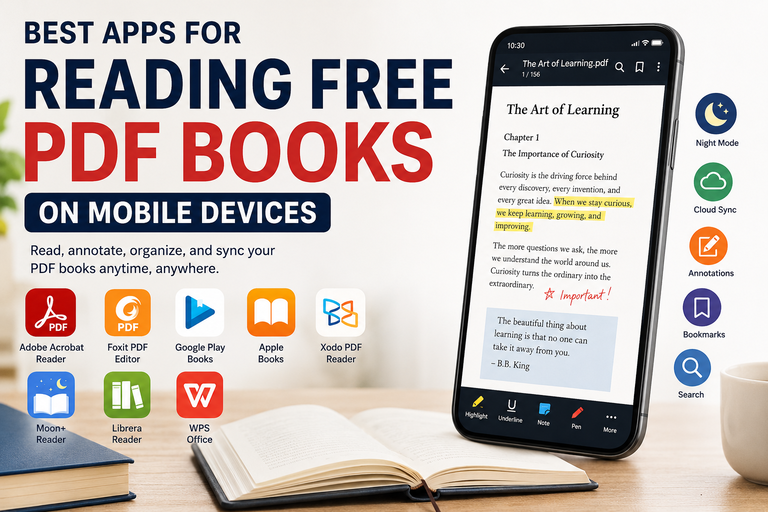
Modern PDF readers offer much more than basic document viewing. Features such as annotations, bookmarks, cloud synchronization, night mode, text search, and customizable layouts allow users to read comfortably and efficiently from virtually anywhere.
This guide explores the best apps for reading free PDF books on smartphones and tablets, highlighting their features, strengths, weaknesses, and ideal use cases.
Why a Good PDF Reader Matters
While most smartphones can open PDF files by default, dedicated PDF reading applications provide a much richer reading experience. A quality PDF reader helps users:
- Read large documents smoothly
- Organize digital libraries efficiently
- Highlight important information
- Take notes while studying
- Access documents across multiple devices
- Reduce eye strain during extended reading sessions
- Read offline without internet access
Choosing the right app can turn your mobile device into a powerful digital library.
What to Look for in a Good PDF Reading App
Before selecting a PDF reader, consider the features that matter most to your reading habits.
Smooth Performance
Large PDF files can contain hundreds of pages and high-resolution images. A good app should open files quickly and allow smooth scrolling without lag.
Annotation Tools
Students and researchers often need to highlight text, underline important sections, add comments, or make handwritten notes.
Night Mode
Dark themes and night modes reduce eye strain during evening reading sessions and can improve battery life on OLED screens.
Search Functionality
The ability to search keywords within documents is invaluable for academic and professional reading.
Cloud Synchronization
Cloud support allows users to access documents across multiple devices while keeping reading progress synchronized.
Offline Reading
The best apps enable users to download and store PDFs locally for reading without internet access.
Library Organization
Managing dozens or even hundreds of PDF files becomes easier with folder management, tags, and library tools.
1. Adobe Acrobat Reader (Android & iOS)
Best For: Reliable and Professional PDF Reading
Adobe created the PDF format itself, making Adobe Acrobat Reader the official and most trusted PDF reader available.
Millions of users worldwide rely on Acrobat Reader for viewing, annotating, and managing PDF documents.
Key Features
- Accurate PDF rendering
- Annotation and highlighting tools
- Text search functionality
- Fill and sign forms
- Cloud storage integration
- Night mode support
- Bookmark management
Advantages
- Excellent compatibility with all PDF files
- Trusted industry standard
- Stable and reliable performance
- Great for academic and business use
Limitations
- Some advanced editing features require a subscription
- Can feel heavier than lightweight alternatives
Ideal Users
- Students
- Researchers
- Office professionals
- Users seeking maximum compatibility
2. Foxit PDF Editor (Android & iOS)
Best For: Speed and Productivity
Foxit has built a strong reputation as one of the fastest PDF readers available. It offers many of the capabilities found in Adobe Acrobat while maintaining a lightweight design.
Key Features
- Annotation tools
- Text reflow mode
- Password-protected document support
- Cloud synchronization
- Night mode
- Document sharing
Advantages
- Fast loading speeds
- Clean user interface
- Excellent annotation features
- Efficient resource usage
Limitations
- Premium features require payment
- Free version may include advertisements
Ideal Users
- Productivity-focused readers
- Students
- Mobile professionals
3. Google Play Books (Android & iOS)
Best For: Simple Cloud-Based Reading
Many users don't realize that Google Play Books allows uploading personal PDF files for free. Once uploaded, documents become accessible across all connected devices.
Key Features
- PDF upload capability
- Automatic cloud synchronization
- Offline reading
- Night mode
- Cross-device access
- Clean reading interface
Advantages
- Easy to use
- No advertisements
- Excellent cloud integration
- Automatic synchronization
Limitations
- Limited annotation capabilities
- Not designed for extensive academic work
Ideal Users
- Casual readers
- Frequent travelers
- Users with multiple devices
4. Apple Books (iOS Only)
Best For: Apple Ecosystem Users
Apple Books provides one of the most polished PDF reading experiences available for iPhone and iPad users.
The application integrates seamlessly with iCloud, allowing PDFs and reading progress to synchronize automatically.
Key Features
- PDF import support
- iCloud synchronization
- Highlighting and notes
- Bookmark management
- Dark mode
- Smooth page transitions
Advantages
- Elegant design
- Excellent performance
- Strong integration with Apple devices
- User-friendly interface
Limitations
- Available only on Apple devices
- Fewer advanced editing tools
Ideal Users
- iPhone users
- iPad users
- Apple ecosystem enthusiasts
5. Xodo PDF Reader & Editor (Android & iOS)
Best For: Students and Researchers
Xodo is widely regarded as one of the best free PDF readers for academic work. Its extensive annotation capabilities make it particularly useful for students and researchers.
Key Features
- Advanced highlighting tools
- Note-taking functionality
- PDF form filling
- Cloud integration
- Night mode
- Document collaboration
- Tabbed viewing
Advantages
- Powerful annotation features
- Free core functionality
- Excellent for studying
- Smooth document navigation
Limitations
- Interface may feel complex for beginners
- Collaboration tools may be unnecessary for casual readers
Ideal Users
- Students
- Researchers
- Academics
- Professional reviewers
6. Moon+ Reader (Android Only)
Best For: Reading Customization
Moon+ Reader is one of Android's most customizable reading applications. Although originally designed for eBooks, it handles PDF files effectively.
Key Features
- Extensive theme customization
- Gesture controls
- Blue light filter
- Adjustable brightness
- Bookmarks
- Reading statistics
Advantages
- Highly customizable
- Comfortable night reading
- Lightweight performance
Limitations
- PDF support is not as advanced as dedicated PDF apps
- Some premium features require upgrading
Ideal Users
- Android enthusiasts
- Night readers
- Users who enjoy personalization
7. Librera Reader (Android)
Best For: Multi-Format Libraries
Librera Reader supports numerous document formats beyond PDFs, making it an excellent choice for users who maintain large digital libraries.
Supported Formats
- EPUB
- MOBI
- DJVU
- FB2
- CBR
- CBZ
Key Features
- Text-to-speech support
- Library management tools
- Offline reading
- Custom themes
- Lightweight design
Advantages
- Broad format compatibility
- Efficient performance
- Free and open-source options
- Strong library organization
Limitations
- Less polished interface
- Limited cloud integration
Ideal Users
- Multi-format readers
- Open-source enthusiasts
- Users with extensive eBook collections
8. WPS Office (Android & iOS)
Best For: Document Management and Productivity
WPS Office combines PDF reading with office productivity tools, making it useful for users who frequently work with multiple document types.
Key Features
- PDF viewing
- PDF editing
- File conversion
- Document scanning
- Cloud storage integration
- Annotation tools
Advantages
- All-in-one productivity suite
- Strong editing capabilities
- Multiple document formats supported
Limitations
- Free version contains ads
- Interface may appear crowded
Ideal Users
- Business professionals
- Office workers
- Productivity-focused users
Comparison Summary
| App | Best For | Platform | Annotation Level | Cloud Sync |
|---|---|---|---|---|
| Adobe Acrobat Reader | Professional use | Android/iOS | Advanced | Yes |
| Foxit PDF Editor | Speed and productivity | Android/iOS | Advanced | Yes |
| Google Play Books | Cloud reading | Android/iOS | Basic | Yes |
| Apple Books | Apple ecosystem | iOS | Basic | Yes |
| Xodo PDF Reader | Students and researchers | Android/iOS | Advanced | Yes |
| Moon+ Reader | Customization | Android | Moderate | Limited |
| Librera Reader | Multi-format libraries | Android | Moderate | Limited |
| WPS Office | Productivity | Android/iOS | Advanced | Yes |
Tips for Better PDF Reading on Mobile Devices
1. Use Landscape Orientation
Wide documents, textbooks, and reports often become easier to read in landscape mode.
2. Enable Night Mode
Night mode reduces glare and minimizes eye fatigue during extended reading sessions.
3. Adjust Zoom Levels
Most PDF readers allow custom zoom settings that improve readability on smaller screens.
4. Use Reflow Mode
Apps like Foxit can rearrange text to fit mobile screens, eliminating excessive horizontal scrolling.
5. Organize Your Digital Library
Create folders based on categories such as:
- Academic
- Fiction
- Professional
- Research Papers
- Manuals
This makes finding documents much easier.
6. Download Files Before Traveling
Offline access ensures uninterrupted reading when internet connectivity is unavailable.
7. Consider Using a Tablet
For lengthy reading sessions, tablets provide a larger screen and a more comfortable experience than smartphones.
8. Take Advantage of Annotations
Highlighting important passages and adding notes improves retention and helps with future reference.
Choosing the Right PDF Reader for Your Needs
Different readers excel in different situations.
Choose Adobe Acrobat Reader if:
- You want maximum reliability.
- You regularly handle professional documents.
- Compatibility is your top priority.
Choose Xodo if:
- You are a student.
- You annotate heavily.
- You work with academic papers.
Choose Google Play Books if:
- You prefer simplicity.
- You read casually.
- Cloud synchronization is important.
Choose Apple Books if:
- You use iPhone or iPad exclusively.
- You value a polished user experience.
Choose Moon+ Reader if:
- You enjoy customization.
- You frequently read at night.
- You want complete control over the reading interface.
Choose Librera Reader if:
- You read multiple file formats.
- You maintain a large eBook collection.
Choose WPS Office if:
- You need PDF reading and editing.
- You frequently work with office documents.
Final Thoughts
PDF books continue to be one of the most accessible ways to distribute and consume digital content. Whether you're reading free novels, academic journals, educational resources, technical manuals, or professional reports, the right mobile app can dramatically improve your experience.
For overall reliability, Adobe Acrobat Reader remains a top choice. For students and researchers, Xodo PDF Reader offers some of the best annotation tools available. Users seeking simplicity and seamless cloud access may prefer Google Play Books, while Apple Books provides an excellent experience for iPhone and iPad users. Android readers who value customization will find Moon+ Reader particularly appealing.
By choosing an app that matches your reading habits and workflow, you can transform your smartphone or tablet into a portable digital library and enjoy free PDF books anytime, anywhere.