How to Organize Your Free eBook Collection Efficiently
In today's digital world, free eBooks are easier to acquire than ever. From public domain classics and educational resources to promotional downloads, industry reports, and webinar handouts, readers can accumulate hundreds or even thousands of digital books without spending a dime.
While building a free eBook library can be exciting, it often leads to a common problem: digital clutter. Files become scattered across devices, cloud storage accounts, email attachments, and download folders. Before long, finding a specific title becomes frustrating, duplicate files pile up, and valuable resources get forgotten.
Fortunately, organizing your free eBook collection doesn't have to be complicated. With a systematic approach, you can transform a chaotic assortment of files into a well-structured digital library that is easy to browse, search, and enjoy.
This comprehensive guide will walk you through the best practices for organizing your free eBook collection efficiently and maintaining it over time.
Why Organizing Your eBook Collection Matters
Many people focus on collecting eBooks but overlook organization. However, a well-organized library offers several advantages:
- Faster access to desired books
- Reduced digital clutter
- Improved reading experience
- Better device compatibility
- Easier backup and recovery
- Increased likelihood of actually reading your books
Most importantly, organization helps you turn your collection into a practical knowledge resource rather than a forgotten archive.
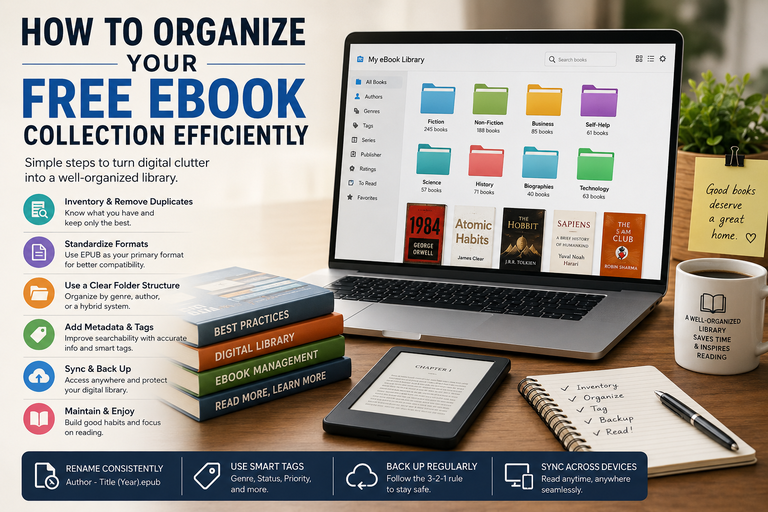
1. Create a Complete Inventory of Your eBooks
Before you can organize your collection, you need a clear understanding of what you own.
Gather eBooks from All Sources
Start by locating every eBook you have stored across various platforms, including:
- Desktop and laptop computers
- Download folders
- Documents folders
- External hard drives
- USB drives
- eReaders (Kindle, Kobo, Nook, etc.)
- Smartphones and tablets
- Cloud storage services
- Email attachments
Many readers are surprised to discover multiple copies of the same book scattered across different devices.
Consolidate into One Temporary Location
Create a master folder and move all eBooks into it temporarily.
For example:
Master eBook CollectionThis central location allows you to assess the size of your library and begin organizing efficiently without overlooking hidden files.
2. Eliminate Duplicate and Unnecessary Files
One of the biggest causes of eBook clutter is duplication.
You may have downloaded the same title multiple times in different formats or stored identical copies on several devices.
Use Duplicate Detection Software
Several tools can automatically identify duplicate files, including:
- CCleaner
- Duplicate Cleaner
- Gemini (Mac users)
- Easy Duplicate Finder
These applications compare filenames, file sizes, and content to help you safely remove unnecessary copies.
Remove Low-Value Content
Take this opportunity to evaluate the quality of your collection.
Consider deleting:
- Outdated guides
- Poorly formatted PDFs
- Incomplete downloads
- Temporary promotional materials
- Books you downloaded impulsively but no longer want
Remember, a smaller, curated collection is often more useful than a massive, disorganized one.
3. Standardize Your File Formats
Free eBooks are distributed in many different formats.
Common formats include:
- EPUB
- MOBI
- AZW
- DOCX
- TXT
Managing multiple formats can complicate organization and device compatibility.
Choose a Primary Format
For most users, EPUB is the best choice because it offers:
- Broad compatibility
- Adjustable text sizing
- Responsive layouts
- Smaller file sizes
Keep PDFs for Special Content
PDFs remain useful for:
- Technical manuals
- Textbooks
- Workbooks
- Documents requiring fixed formatting
Convert Files When Necessary
Using conversion software allows you to maintain consistency throughout your collection.
Popular conversion tools include:
- Calibre
- Online conversion services
- Dedicated eBook converters
Standardized formats simplify transfers between devices and improve your overall reading experience.
4. Build a Logical Folder Structure
A thoughtful folder hierarchy makes navigation significantly easier.
The key is choosing a structure that aligns with how you naturally search for books.
Method 1: Organize by Genre
Many readers prefer genre-based organization.
Example:
eBooks/
├── Fiction/
│   ├── Fantasy/
│   ├── Mystery/
│   ├── Science Fiction/
│   └── Romance/
│
└── Non-Fiction/
    ├── Business/
    ├── History/
    ├── Self-Help/
    └── Technology/
Method 2: Organize by Author
Ideal for readers who frequently search by author.
Example:
eBooks/
├── Austen, Jane/
├── Orwell, George/
├── Rowling, J.K./
└── King, Stephen/
Method 3: Use a Hybrid System
Combining genre and author categories often provides the best balance.
Example:
eBooks/
├── Fiction/
│   ├── Orwell, George/
│   └── Tolkien, J.R.R./
│
└── Non-Fiction/
    ├── Clear, James/
    └── Sinek, Simon/
Whichever structure you choose, consistency is essential.
5. Rename Files Using a Consistent Convention
Free downloads often arrive with confusing filenames such as:
ebook_final_v3_new.pdfor
download_2024_ebook_01.epubThese names become problematic as your library grows.
Recommended Naming Format
Use:
Author - Title (Year).epubExamples:
Orwell, George - 1984 (1949).epub
Austen, Jane - Pride and Prejudice (1813).epub
Benefits of Consistent Naming
- Faster searching
- Better sorting
- Improved compatibility
- Easier backups
- Cleaner appearance
Bulk-renaming software can automate the process for larger collections.
6. Use eBook Management Software
Once your collection exceeds 50–100 books, manual organization becomes increasingly difficult.
This is where dedicated library software becomes invaluable.
Why Calibre Is the Gold Standard
Calibre is one of the most popular eBook management tools available.
Its features include:
- Library organization
- Format conversion
- Metadata editing
- Cover management
- Device synchronization
- Search and filtering tools
- Catalog creation
Calibre acts as a centralized command center for your digital library, making it easier to manage even thousands of books.
Benefits of Dedicated Management Software
- Faster organization
- Better search functionality
- Automatic metadata retrieval
- Enhanced reading workflows
- Improved device integration
For serious eBook collectors, management software is often the most important organizational tool.
7. Improve and Standardize Metadata
Metadata is the information embedded within eBook files.
Examples include:
- Title
- Author
- Publisher
- Publication date
- Description
- Genre
- Series information
- Cover image
Unfortunately, free eBooks often contain missing or inaccurate metadata.
Why Metadata Matters
Most reading applications rely heavily on metadata for sorting and display.
Incorrect metadata can lead to:
- Books appearing under the wrong author
- Missing cover images
- Broken series order
- Search difficulties
Improve Metadata Quality
Review and update:
- Author names
- Book titles
- Publication years
- Series numbers
- Genre classifications
- Descriptions
Accurate metadata dramatically improves library usability.
8. Use Smart Tagging Systems
Tags provide an additional layer of organization beyond folders.
Think of tags as searchable labels.
Genre-Based Tags
Examples include:
- Classic Literature
- Business
- Psychology
- Technology
- Biography
Reading Purpose Tags
Examples:
- Research
- Reference
- Study Material
- Quick Reads
Reading Status Tags
Many readers find status tags especially useful:
- To Read
- Currently Reading
- Completed
- Favorites
- Re-read
Tags allow you to locate books instantly without navigating folder structures.
9. Synchronize Across Devices
Modern readers frequently switch between devices.
You may start reading on your laptop and continue later on your phone or tablet.
Use Cloud Storage
Cloud services help centralize your collection.
Popular options include:
- Google Drive
- Dropbox
- OneDrive
- iCloud
Advantages include:
- Automatic syncing
- Remote access
- Additional backup protection
- Easy file sharing
Connect with Reading Applications
Many reading platforms support synchronization, including:
- Kindle
- Apple Books
- Kobo
- Google Play Books
Maintaining a synchronized library ensures your books remain accessible wherever you are.
10. Back Up Your Collection Properly
Although your eBooks may be free, losing them can still be frustrating.
Some free resources become unavailable over time, making backups essential.
Follow the 3-2-1 Backup Rule
A proven backup strategy consists of:
- Three copies of your data
- Two different storage mediums
- One off-site backup
Example:
Primary Copy
- Computer
Secondary Copy
- External hard drive
Off-Site Copy
- Cloud storage
This approach minimizes the risk of data loss caused by hardware failure, accidental deletion, theft, or malware.
11. Develop Ongoing Maintenance Habits
Even the best organizational system can become messy without maintenance.
Best Practices for New Downloads
Whenever you acquire a new eBook:
- Rename it immediately.
- Verify metadata.
- Assign tags.
- Move it to the correct folder.
- Remove unnecessary duplicates.
Schedule Monthly Reviews
A 10–15 minute monthly review can help you:
- Remove clutter
- Correct metadata issues
- Update reading statuses
- Organize new acquisitions
Small, regular maintenance prevents major cleanup projects later.
12. Create a Reading Queue
One of the biggest mistakes eBook collectors make is focusing on collecting rather than reading.
An organized reading queue helps bridge that gap.
Build a Priority List
Maintain a small selection of books you intend to read next.
For example:
To Read Next
├── High Priority
├── Medium Priority
└── Low Priority
Limit Your Active Reading List
Instead of choosing from hundreds of books every time you finish one, keep a shortlist of five to ten titles.
Benefits include:
- Reduced decision fatigue
- Increased reading consistency
- Better focus
- Improved completion rates
An organized library should encourage reading, not overwhelm you with options.
Common Mistakes to Avoid
As you organize your collection, avoid these common pitfalls:
Overcomplicating the System
Complex structures often become difficult to maintain.
Keep your system simple and intuitive.
Ignoring Metadata
Even perfectly organized folders become less useful if metadata is inaccurate.
Failing to Back Up Files
A single hardware failure can erase years of collecting.
Keeping Everything
Not every free download deserves permanent storage.
Regular pruning keeps your library manageable.
Final Thoughts
A well-organized free eBook collection is more than just a tidy folder structure it is a personalized digital library designed for accessibility, efficiency, and enjoyment.
By creating a complete inventory, eliminating duplicates, standardizing formats, implementing a clear folder system, improving metadata, and utilizing powerful tools such as Calibre, you can transform digital chaos into an organized knowledge hub.
Most importantly, remember that organization should support your reading habits rather than complicate them. A simple system that you consistently maintain will always outperform an elaborate structure that becomes difficult to manage.
With a little effort and regular upkeep, your free eBook collection can remain searchable, accessible, and valuable for years to come helping you spend less time hunting for books and more time enjoying them.