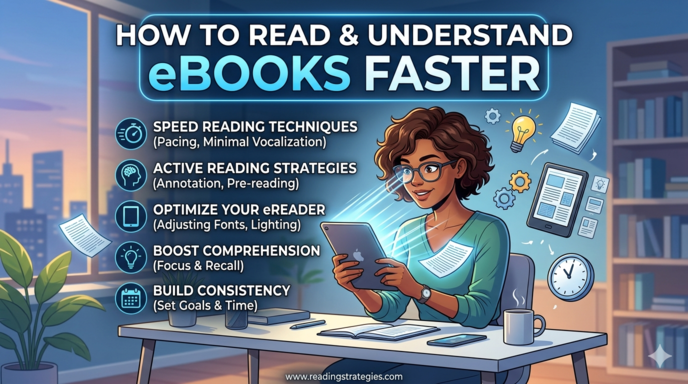
How to Read and Understand eBooks Faster
In the digital age, eBooks have transformed the way people access information. From students studying for exams to professionals learning new skills, eBooks provide instant access to vast amounts of knowledge at a lower cost and greater convenience than traditional printed books. With just a smartphone, tablet, or e-reader, anyone can carry an entire library wherever they go.
However, while eBooks offer many advantages, reading on a screen can be challenging. Many readers find themselves losing focus, reading slowly, or struggling to retain what they have read. Notifications, screen fatigue, and passive reading habits often reduce both reading speed and comprehension.
To benefit fully from digital reading, it is essential to learn strategies that improve efficiency without sacrificing understanding. Reading faster is valuable, but true productivity comes from reading quickly and remembering what matters. This article explores practical and effective methods to help you read and understand eBooks faster while improving concentration, retention, and learning outcomes.
Set a Clear Purpose Before You Start
One of the most effective ways to improve reading speed and comprehension is to begin with a clear objective. Before opening an eBook, ask yourself why you are reading it.
Consider questions such as:
- What information am I looking for?
- Is this for an assignment, research project, or personal learning?
- What key points do I need to understand?
Having a defined purpose helps direct your attention to relevant information. Instead of reading every word equally, your brain starts prioritizing important ideas and filtering out less useful details. This intentional approach increases focus and allows you to move through the material more efficiently.
For example, a student reading for an exam may focus on definitions, theories, and examples, while a professional reading for general knowledge may focus on broader concepts. When your goal is clear, reading becomes more targeted and productive.
Preview the Content Before Reading
Many readers jump directly into the first page of an eBook without understanding its structure. This often leads to slower reading because the brain has no context for the information being presented.
Previewing the content before reading creates a mental roadmap that helps improve comprehension. Spend a few minutes scanning the material by reviewing:
- The table of contents
- Chapter titles
- Headings and subheadings
- Bold or highlighted terms
- Chapter summaries or conclusions
This quick overview gives you a sense of the organization and main themes of the eBook. As a result, your brain becomes better prepared to process information as you read.
Previewing also allows you to identify which sections deserve more attention and which parts may be less important for your goal. This helps save time and improves reading efficiency.
Use eBook Features Strategically
One of the biggest advantages of digital books is the range of built-in tools they provide. These tools can significantly improve both speed and comprehension if used correctly.
Search Function
Instead of flipping through pages to find information, use the search feature to locate specific terms, names, or topics instantly. This is especially useful for reviewing concepts or finding references quickly.
Highlighting and Notes
Highlight key ideas and write brief notes while reading. This helps reinforce understanding and makes later review easier. However, avoid highlighting too much, as excessive marking reduces the usefulness of your notes.
Bookmarks
Use bookmarks to mark important chapters or sections that you may need to revisit later. This improves organization and saves time.
Dictionary and Translation Tools
Most eBooks allow readers to tap on unfamiliar words for instant definitions or translations. This prevents interruptions in reading flow and supports faster understanding.
Using these tools wisely transforms reading into a more interactive and efficient learning experience.
Create a Distraction-Free Reading Environment
One major challenge of digital reading is the number of distractions that come with electronic devices. Notifications, messages, social media apps, and multiple browser tabs can easily interrupt concentration.
To improve focus:
- Turn off notifications
- Use full-screen reading mode
- Close unnecessary apps or tabs
- Choose a quiet environment
Your physical reading setup also matters. Adjust the screen brightness and font size to suit your comfort level. Poor lighting or small text increases eye strain and reduces focus.
A calm, distraction-free environment allows your brain to stay engaged, helping you read faster while maintaining comprehension.
Practice Active Reading
Reading faster does not mean skimming without understanding. To improve both speed and retention, you need to engage actively with the material.
Active reading involves interacting mentally with the content by:
- Asking questions while reading
- Summarizing ideas in your own words
- Predicting what comes next
- Relating new information to prior knowledge
For example, after reading a paragraph, pause briefly and identify the main idea. This strengthens comprehension and helps transfer information into long-term memory.
Active readers process information more deeply, which reduces the need for repeated reading and ultimately improves reading speed.
Break Reading into Smaller Sessions
Long reading sessions often lead to fatigue, reduced concentration, and slower reading speed. Instead of trying to finish an entire chapter in one sitting, divide the reading into manageable sections.
A useful approach is the Pomodoro Technique:
- Read for 25 to 30 minutes
- Take a 5-minute break
- Repeat the cycle
Short reading sessions help maintain mental energy and improve concentration. They also make large reading tasks feel less overwhelming.
By pacing your reading, you sustain a steady speed and improve comprehension over longer periods.
Improve Your Digital Reading Speed
Speed reading techniques can help you read eBooks faster, but they must be practiced carefully to avoid reducing comprehension.
Reduce Subvocalization
Subvocalization is silently pronouncing each word in your mind. While natural, it slows reading speed. Try focusing on phrases or groups of words instead of individual words.
Avoid Regression
Regression means unnecessarily re-reading words or sentences. This interrupts reading flow and slows progress. Using your finger or cursor as a guide can help your eyes move forward consistently.
Expand Your Visual Span
Train your eyes to recognize multiple words at once instead of reading word by word. This increases reading efficiency and helps you process information more quickly.
These techniques take practice, but they gradually improve reading speed while maintaining understanding.
Take Notes in Your Own Words
Highlighting important passages is useful, but real understanding comes from processing the information yourself. After reading a section, write down:
- A short summary
- Key points
- Important definitions
- Questions for review
Writing notes in your own words forces your brain to interpret and organize information, which improves comprehension and retention.
This method also creates a personalized review guide that can save time later when revising the material.
Use Multimedia Features Carefully
Some eBooks contain hyperlinks, videos, audio clips, and interactive graphics. These tools can improve understanding, especially when explaining difficult concepts.
However, they can also distract you from your main reading goal.
Use multimedia only when:
- It clarifies a difficult concept
- It directly supports the content
- It improves your understanding
Avoid clicking unrelated links or exploring unnecessary content, as this breaks concentration and slows progress.
Review What You Read
Reading faster is only useful if you remember the information afterward. Reviewing helps reinforce what you have learned and improves retention.
After completing a reading session:
- Review your highlights
- Re-read your notes
- Test yourself on the main ideas
- Explain the content aloud
Explaining concepts as if teaching someone else is especially effective. This method reveals gaps in understanding and strengthens memory.
Review turns reading into learning, ensuring that speed does not come at the expense of comprehension
Protect Your Eyes and Mental Focus
Digital reading can strain your eyes and reduce mental focus if done for long periods without breaks. Eye fatigue often leads to slower reading and reduced comprehension.
To reduce strain:
- Follow the 20-20-20 rule: every 20 minutes, look at something 20 feet away for 20 seconds
- Blink frequently
- Stay hydrated
- Rest when tired
Taking care of your physical well-being improves your ability to concentrate and read efficiently.
Choose the Right Device
The device you use affects your reading speed and comfort. Small smartphone screens may be convenient, but they are often less effective for long reading sessions.
For better results:
- Use an e-reader with e-ink display
- Use tablets for larger text and easier navigation
- Enable night mode in low light
A comfortable reading device reduces eye strain and supports better concentration, helping you read faster with less effort.
Conclusion
Reading and understanding eBooks faster is not about rushing through pages it is about combining speed with comprehension. By setting clear goals, previewing the content, minimizing distractions, using digital tools effectively, and reviewing what you read, you can greatly improve your reading efficiency.
In a world where digital information continues to grow, mastering efficient eBook reading is an essential skill for students, professionals, and lifelong learners. With the right strategies, you can save time, improve understanding, and make digital reading a more productive and rewarding experience.