
How Teachers Can Use eBooks for Better Learning Outcomes
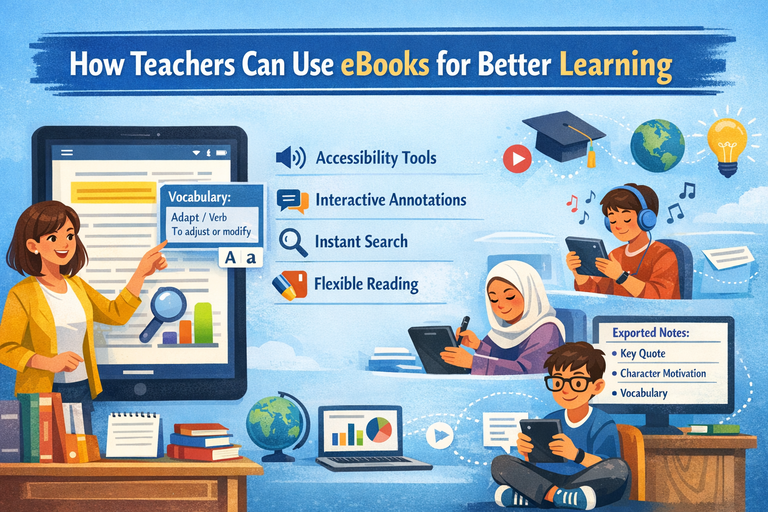
eBooks are often seen as simple digital replicas of print books. But when used intentionally, they become powerful, flexible learning tools that can transform how students read, study, and engage with content. Features such as adjustable text size, built-in dictionaries, text-to-speech, instant search, collaborative annotation, and multimedia integration allow teachers to design more inclusive and effective learning experiences.
The real impact of eBooks does not come from the technology itself it comes from pairing eBook features with sound instructional practices: clear learning goals, strong reading routines, and a commitment to equitable access. This article explores practical, classroom-ready strategies for using eBooks to improve learning outcomes while avoiding common pitfalls.
Why eBooks Can Improve Learning
1. Access and Flexibility
One of the strongest advantages of eBooks is access.
-
Anytime reading: Students can read on school-issued devices, personal devices, or offline (depending on the platform).
-
Instant distribution: Teachers can assign texts immediately without waiting for physical class sets. This also makes differentiation by reading level or language much easier.
-
Portability: A single device can hold an entire classroom or school library, reducing logistical barriers to reading.
This flexibility supports independent reading habits and ensures that learning is not limited to the classroom.
2. Built-In Supports for Comprehension and Vocabulary
Many eBook platforms include tools such as:
-
Dictionary and translation tools
-
Keyword search
-
Highlighting and annotation
-
Read-aloud or text-to-speech
-
Adjustable font size, spacing, and background color
These features align closely with Universal Design for Learning (UDL), which emphasizes providing multiple means of representation and support so more learners can access the same learning goals. Instead of modifying expectations, teachers can offer multiple pathways to understanding.
3. Better Navigation for Study and Research
Digital navigation tools make eBooks especially effective for academic reading. Students can:
-
Locate evidence quickly using search
-
Bookmark important sections
-
Use linked tables of contents to move efficiently
-
Track themes or ideas across chapters
For research and close reading, these tools reduce cognitive friction and allow students to focus more on analysis than on page-flipping.
4. Opportunities for Active Reading
Learning improves when students actively interact with text. eBooks can support active reading by making it easier to:
-
Annotate with highlights and notes
-
Share annotations in groups
-
Export notes for writing or discussion
When students question, summarize, and connect ideas as they read rather than passively consuming text comprehension and retention increase.
Start With Learning Goals, Not Devices
Before selecting an eBook platform or assigning digital texts, teachers should define what “better learning” looks like for their students. Common goals include:
-
Stronger comprehension and retention
-
Increased independent reading
-
Improved academic vocabulary
-
Better evidence-based writing
-
More inclusive access for multilingual learners and students with disabilities
Once goals are clear, teachers can choose eBook features and instructional strategies that directly support those outcomes.
Choosing the Right eBooks and Platforms
A Quick Selection Checklist
Content Quality
-
Appropriate reading levels and cultural relevance
-
Credible authors and publishers
-
Up-to-date nonfiction when accuracy matters
-
Clear structure with headings, images, and glossaries
Usability
-
Fast loading and reliable performance
-
Compatibility with available devices
-
Offline access when needed
-
Simple annotation and note-taking tools
Accessibility
Look for platforms that support established accessibility standards:
-
Screen reader compatibility
-
Keyboard navigation
-
Alt text for images
-
Accessible EPUB features
Licensing and Privacy
-
Understand whether licenses are per student, per class, or limited by checkouts
-
Review student data collection and privacy policies
-
Follow local and regional regulations related to student data protection
Instructional Strategies That Make eBooks W
ork
1. Teach Digital Reading Skills Explicitly
Reading on screens often encourages skimming. Students benefit from explicit instruction in digital reading habits, including:
-
Using tables of contents and bookmarks effectively
-
Annotating with purpose (questions, summaries, connections)
-
Using search strategically rather than as a shortcut
-
Managing links and multimedia without losing focus
Mini-lesson idea (10 minutes):
Model annotation on a shared screen. Highlight a key claim, add a margin note explaining its importance, and write one genuine question you still have.
Before During After Reading Routines Using eBooks
Before Reading: Prime Comprehension
-
Preview with purpose: Students scan headings and images and write two predictions in a note.
-
Vocabulary preload: Identify essential terms; students use built-in dictionaries or translation tools to add student-friendly definitions.
-
Annotation targets: Set clear expectations (e.g., “Highlight two moments that reveal character motivation and explain each”).
During Reading: Active, Accountable Reading
-
Guided checkpoints: Build stopping points where students respond to prompts in a shared document or discussion forum.
-
Annotation roles: In groups, assign roles such as Summarizer, Questioner, Connector, or Vocabulary Captain.
-
Color-coded close reading:
-
Yellow = key ideas
-
Blue = evidence
-
Green = unfamiliar words
-
Pink = questions or confusions
-
After Reading: Deepen Thinking
-
Evidence-based responses: Students use search to locate a quote and explain how it supports an inference.
-
Synthesis across texts: Students export highlights from multiple eBooks and write a synthesis paragraph.
-
Micro-presentations: Students present one annotated passage and explain their thinking process.
Using eBooks for Differentiated Instruction
Supporting Struggling Readers Without Lowering Expectations
-
Use larger fonts, increased line spacing, or dyslexia-friendly fonts when available
-
Offer text-to-speech to reduce decoding load
-
Chunk reading assignments using bookmarks
-
Provide sentence starters and guided questions that progress from literal to analytical
Extending Learning for Advanced Readers
-
Pair core texts with author interviews, primary sources, or related essays
-
Offer challenge annotations focused on theme, symbolism, or rhetoric
-
Have students create glossary entries or discussion questions for peers
Supporting Multilingual Learners
-
Encourage translation tools for key terms, not entire passages
-
Build shared vocabulary banks with examples in context
-
Provide audio and text together when possible
UDL principles offer a strong framework for planning these supports across diverse classrooms.
Making eBooks Interactive Without Causing Distraction
A simple rule helps manage digital overload:
If a feature does not support the learning target, do not use it.
Effective Uses of Multimedia
-
Diagrams or short clips that clarify complex concepts
-
Audio narration to support fluency and access
Risky Uses
-
Excessive animations, links, or games that interrupt comprehension and increase cognitive load
Intentional restraint keeps students focused on meaning rather than novelty.
Assessment Ideas Designed for eBooks
Formative Assessment
-
Spot-check a small sample of annotations for quality
-
Require one- or two-sentence “gist” notes after sections
-
Exit tickets asking students to find and explain a supporting quote
Summative Assessment
-
Reading portfolios: Exported highlights and notes with reflections
-
Text-dependent writing: Essays that cite annotated evidence
-
Project-based learning: Research projects using multiple eBooks with source logs
Simple rubric dimensions:
-
Accuracy of understanding
-
Quality of evidence
-
Depth of explanation and analysis
-
Purposeful annotation habits
Building Classroom Routines That Prevent Chaos
Device and Attention Management
-
Establish “screens down” moments for discussion
-
Clarify when search and links are allowed
-
Teach students how to manage notifications
Equity and Access
Plan for students with limited device or internet access:
-
Enable offline downloads
-
Provide in-class reading time
-
Offer printable excerpts when licensing allows
Academic Integrity
Design prompts that require thinking, not answer-hunting:
-
“Explain how the author develops the argument across pages X–Y.”
-
“Compare two passages and analyze the shift in tone.”
A Practical Two-Week Rollout Plan
Week 1: Foundations
-
Teach platform basics: navigation, bookmarking, annotating, exporting notes
-
Model three annotation types: summarize, question, connect
-
Conduct a short shared eBook reading with guided checkpoints
Week 2: Independence
-
Students read in groups using annotation roles
-
Teacher conferences focus on one bookmarked section and notes
-
Students complete a short evidence-based writing task using exported highlights
Common Mistakes to Avoid
-
Using eBooks as a direct substitute for print without changing instruction
-
Over-grading annotations, which discourages authentic thinking
-
Introducing too many features at once
-
Assuming all students prefer screens offer print options when possible
Conclusion
Teachers achieve the strongest results with eBooks when they treat them as reading and learning environments, not just digital files. By starting with clear learning goals, explicitly teaching digital reading habits, and using eBook features to support comprehension and accessibility, educators can build consistent routines that promote active reading and evidence-based thinking.
When used well, eBooks expand access, make student thinking more visible, and strengthen engagement without sacrificing rigor. The goal is not more technology, but better learning